Which Tag Should You Use for Lists in HTML, and What Does Each One Actually Mean
Recently, during a few interviews, I ended up talking about my blog. That led me to revisit the long-forgotten folk game of "reading code," whose popularity has dropped sharply these days. While doing that, I ran into a question that suddenly made me curious, so I dug into it as far as I could and decided to write it down. It has little practical value, but I enjoy this kind of thing.
Getting started
I noticed this component on the blog. It represents a table of contents, and since a table of contents is also a kind of list, you can see that it uses <ul>.1
function TableOfContents({ nodes }: { nodes: TocEntry[] }) {
  return (
    <ul>
      {nodes.map((node) => (
        <li key={node.url}>
          <a href={node.url}>{node.title}</a>
        </li>
      ))}
    </ul>
  );
}
Not just here—whenever I needed to represent a list, I usually used <ul>. But looking at it again after a long time, I started to wonder. Why had I been using <ul> so habitually?
There is also the <ol> tag for lists. I knew that too. But I could barely remember ever using it. Even tags with lower name recognition, like <dl>, had seen some use from me, but <ol> had almost never come up. To be honest, I was fuzzy on when exactly I was supposed to use it. That discomfort is what started this post.
Questions about list order
Why had I almost never thought of using <ol>? I started reasoning from what I already knew.
The <ul> element represents a list where order is not important, and the <ol> element represents a list where order matters. The names themselves are short for "unordered list" and "ordered list," so that part is straightforward.
But what does it actually mean for a list to have order? A good example of a list that suits <ol> would be a recipe.2 The order in a recipe is not just there to make it easier to read. The order itself is part of the information.
<h1>치킨난반 만들기</h1>
<ol>
    <li>닭다리살의 두꺼운 부분을 펴고 소금과 후추로 밑간한다.</li>
    <li>닭다리살에 밀가루를 얇게 묻힌 뒤 풀어둔 달걀에 담근다.</li>
    <li>...</li>
</ol>
Of course, there are many examples of lists where order clearly matters: instructions, rankings, and so on.
But working in frontend development, I had not often encountered lists where anyone would obviously insist that the order itself needed emphasis. I do remember a few times thinking about using <ol>, then deciding on <ul> because the order did not seem that important. That led to two questions.
- What exactly counts as a list that "needs order"?
Most lists shown on screen are ordered in one way or another. Completely unordered lists are arguably less common. For example, the posts on this blog are sorted newest first, and the contacts on my phone are sorted alphabetically by name. Does that mean they are ordered lists? But if I sorted blog posts by view count instead, or contacts by frequency of contact, nothing would really break. So what is the actual criterion for a list that requires order?
- Is there any benefit to using
<ol>?
When I first learned <ol>, I was told that it automatically numbers its inner <li> items, which makes it convenient if you later insert something in the middle of the list. But in today's world, where CSS can style just about anything, that is hard to call a meaningful advantage. So if order matters, what is actually gained by using <ol>?
A practical conclusion
If changing the order of items would also change the meaning of the list, use <ol>. Otherwise, use <ul>. This is supported by MDN, the HTML standard, and other sources.
There is also no major benefit that comes from using <ol>. If you really wanted to name one, <ol> has a few attributes such as reversed and start that help express the meaning of order more precisely, so you can write slightly more semantic code. But those attributes are nearly forgotten. And using <ol> correctly is unlikely to have any major SEO impact.
So when developing today, I think it is enough to briefly ask yourself, "Would this list break if I changed the order?" and decide from there. In that sense, it was not all that strange that I had effectively been treating <ul> as the default list tag. On the real web as well, <ul> is used far more often than <ol>.3
The unnecessary deep dive begins
Still, while researching, I never quite felt like I had something solid in hand. It was clear that this distinction is the one to use today, but some older sources I found were subtly out of sync with each other.
The rendering of the lists is not defined here, but a bulleted list is quite appropriate for an unordered list, and a sequence of numbered paragraphs for an ordered list.
W3C historical document, HTML Tags, 1992.114
An ordered list, created using the
OLelement, should contain information where order should be emphasized, as in a recipe.HTML 4 specification, 10. Lists5
I also found many old documents saying things like <ol> does not mean a sorted list, or that browsers which cannot clearly express the difference between the two may implement <ul> and <ol> the same way. Some even questioned whether <ol> was necessary at all.
That made me curious. How did this distinction between list tags come about? And why do sources about the difference between <ul> and <ol> vary slightly from one another? To summarize first:
HTML, true to its name—HyperText Markup Language—is a kind of markup language. Markup began in document typesetting, but it soon shifted toward organizing documents around semantic structure such as headings and lists. In that process, list elements like OL and UL emerged, and later continued into SGML.
When Tim Berners-Lee created HTML, he adopted a great deal of the syntax of SGML, a language familiar to many people at the time. That is how <ol> and <ul> became part of HTML as well. But at first, the criteria for distinguishing their use were not as clear as they are today. It was only with HTML5 that the specification explicitly adopted the rule: "Does changing the order change the meaning of the document?"
That is the short version, but since it would be a waste to stop after doing all this research, I will unpack it a bit more.
From typesetting to markup
I considered writing out the entire path leading up to HTML in detail, section by section, like JS 탐구생활 - 클로저 시리즈 2. 수학자들의 꿈에서 JS의 스타가 되기까지. But that would have made the post dull, and painful for me too, so I will summarize.
Originally, "markup" was a printing term. An editor would leave marks on a manuscript such as "make this bold," and a typesetter would use those marks to produce the book.6
Once computer typesetting began, those marks were turned directly into commands. For example, if you wanted something printed centered, you would write a command like .center. One of the early systems was a program called RUNOFF in the 1960s, and later there were descendants like roff, which was used to write Unix manuals. The key point is that these systems did not describe what the text meant; they instructed how it should be printed.7 In modern terms, this was closer to TeX.
But procedural typesetting languages had several problems.
First, they lose information. If some text is larger, bolder, or centered, people naturally infer that it is a heading or somehow more important. But at the typesetting stage, all that remains is "make this bold" or "center this." The clues that let you recover the structure and meaning—what is a heading, what is emphasized—are gone. Information that existed in the original document disappears in the typesetting process.
Second, the document becomes tied to a specific device and rendering method. At the time, there were many different output devices and output methods, so procedural commands often ended up usable only on one particular kind of device. One practical consequence was that you could no longer save money by printing drafts on a cheap device and final versions on an expensive one.
There were other problems too, such as procedural typesetting commands being harder to learn.
So in 1969, GML (Generalized Markup Language) was created as a way to describe a document's structure and properties declaratively instead of through procedural commands. In 1981, IBM's C. F. Goldfarb formalized it in a paper.8
It looked like the example below. A single colon, as in :q, marked the opening of an element, and a double colon, as in ::q, marked the closing of one. There were also forms like :p, :ol, and :li, which resemble modern HTML. At the time, :q stood for quotation, so it was somewhat similar to today's <blockquote>.
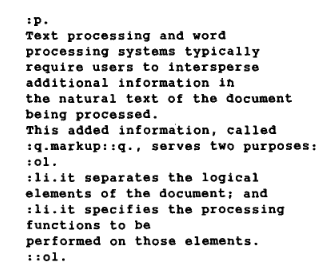
There were also other attempts to define declarative markup, such as Scribe. Who did it first is not the important part here. What matters is that a shift had begun: instead of representing documents through presentation such as font size, people were beginning to represent them through meaningful elements such as headings and paragraphs.
At that time, ordered-list syntax such as :ol was also quite useful. There was no CSS then, and practical concerns like supporting different numbering styles or automatically updating numbers when inserting items were genuinely important.
After that came many efforts to standardize markup, including SGML and ODA. It was during that era that Tim Berners-Lee began designing HTML and the web.
Creating HTML as a markup language
When Tim Berners-Lee created the web and the browser, he faced many design choices, including how documents should be represented.9 He chose declarative markup, and specifically SGML.
He chose declarative markup because a procedural approach to displaying documents was not realistic in the environments he had to support. Tim Berners-Lee built the first browser on a NeXT computer—yes, the one from Steve Jobs's time away from Apple—but there were also many other systems and computing environments out there. A representative example was text-only terminals and the line-mode browser used on them. In modern terms, you can think of it as something like a browser running in a terminal.
If some browsers could not even display bold text, then expressing a heading as "make this bold" was impossible. The same applied to other kinds of formatting: they could not reliably carry the same meaning everywhere. So it made sense to describe the meaning of elements—"this is a heading"—and leave the browser to decide how to display them.
There were two main reasons he chose SGML. One was that, among the various standardization efforts at the time, Tim Berners-Lee believed the SGML camp had the strongest momentum. The other was that CERN, where his team was based, was already using SGML.
SGML was also a diplomatic choice to accommodate CERN. The SGML used on CERN's IBM computers worked by marking up a document with a fixed set of tags in angle brackets, so HTML used as many of the same tags as possible. (...) My reason for this strategy was to get the CERN establishment to say, "Fine, if it's SGML then I can do it too."
Tim Berners-Lee, Weaving the Web, p. 71 in the Korean translation
Tim Berners-Lee was introducing a new approach, so he chose options that would work broadly across existing systems and would be easy for people to accept because they resembled formats already in use. As the quote suggests, most HTML tags followed the SGML syntax used inside CERN.
That was also true for ul and ol. SGML is a metalanguage that defines how to define tags, rather than prescribing a specific list of tags, so list tags did not have to be ul and ol. In actual SGML examples, there are ways to do lists with a list tag. But the SGML syntax used at CERN employed ul and ol, and those were carried directly into HTML. The angle-bracket style of wrapping tags that we all know also came from CERN's SGML practice.
How the ol tag changed in HTML
The list tags <ul> and <ol> are very old—old enough to appear in CERN SGML documents from before HTML. You can also see them in one of the earliest surviving HTML documents, from 1990.
But of the two, <ol> spent a while being neglected. There is plenty of evidence for this.
- The 1991 HTML test document states that the
<ol>tag is displayed the same way as<ul>. - In a January 1992 HTML document written by Tim Berners-Lee, he wrote that
OLwas not currently in use. - In the November 3, 1992 HTML Tags document, the list tags are only
UL,MENU, andDIR. Ordered lists are mentioned, but theOLtag itself does not appear.
If you dig through documents and mailing lists from that time, you find not only missing explanations of <ol>, but also many related requests and questions.
Why was that? It is true that computer environments were so diverse at the time that some browsers could not properly represent ordered lists.10 There were browsers for NeXT with graphical capabilities, but there were also browsers that could display only plain text. Tim Berners-Lee even said that in programs unable to distinguish ol from ul, implementing them the same way was acceptable.
But there was an even more direct reason. In the early web, one of the roles of numbered ordered lists had been significantly replaced by hyperlinks. At least, that was Tim Berners-Lee's view.
In paper documents, it is common to refer to a specific item using numbers and order, as in "see item 3." But in HTML, you can just link directly to the thing being referenced. That was the basic argument.
That said, in the very same email where he made that point, he immediately added a reason to keep <ol>. There was, he said, an abstract difference between an ordered list and a mere collection of items gathered in one place. So <ol> barely made it back into the HTML2 specification.
In other words, <ol> and <ul> might look the same when rendered by a browser, but structurally they were considered to carry different meaning and information.
That distinction did not become firmly established right away. In mailing lists from the 1990s, there were still many questions asking whether ordered lists were truly standard, or how exactly the distinction should be made.11 Even people with substantial expertise, including browser implementers, were asking these things. The semantic difference between the two existed in HTML, but in implementations and the surrounding ecosystem, that difference was still hazy.
So I would not say the distinction was meaningless. Rather, the inherited distinction between <ul> and <ol> from earlier markup traditions was being reinterpreted in the new environment of the web, while the web was still developing its own needs and criteria.
In any case, through that transitional period, the HTML specification gradually became more explicit. In HTML4, <ol> is described as a list where order matters, and a recipe is given as an example. This discussion continued in HTML5 as well. People argued that the criterion for "order matters" was still vague. For example, dialogue has order, but so do paragraphs in a document generally, and one could argue that the order of dialogue is not something that needs to be specially emphasized by making it a list.12
As similar discussions continued, the HTML5 specification finally defined <ol> in 2008 as a "list where changing the order changes the meaning of the document."13 That is the criterion we can easily find today.
Wrapping up
The reason the sources I found were slightly inconsistent with one another is that list tags did not have a clear, modern criterion from the very beginning.
The distinction between ordered and unordered lists was not designed specifically for the web. HTML itself came down a long path through document typesetting, GML, SGML, and CERN's internal context. It was a choice meant to help people familiar with older formats accept HTML. But from the point of view of list tags, their meaning and usage still had to be redefined. Part of what numbering had been used for had become less important on the web.
Even so, <ol> survived one way or another, for whatever reasons were current at the time. At first, the justification was simply that having order among items could itself be meaningful information. Later, there were occasional proposals to restructure lists entirely—such as asking whether lists really needed to be split into <ul> and <ol>, or suggesting a single <list> tag with an attribute for whether it was ordered. But within the sources I checked, all such proposals were rejected. The reasoning was that "there is no additional problem solved by such a change." Personally, I also suspect that standards which prioritize backward compatibility would find it nearly impossible to introduce a breaking change of that sort.
Anyway, the existing elements stayed, while the guidance for when to distinguish between them became steadily more concrete. By the time HTML5 arrived, it had been formalized in essentially the same terms we use today.
<ol>implies that changing the order of the list would change the meaning of the list.<ul>, on the other hand, represents a list where the order is merely aesthetic.14
Of course, this is not a perfectly rigorous definition, so some cases still have to be judged by feel. For example, an ordinary piece of writing can also be seen as a list of paragraphs, and changing the order of paragraphs can change the meaning of the text.
For that, I think it helps to remember the guideline given by an editor of the HTML standard: use list tags when it feels natural to present the content as a sequence of items, and if it feels natural to read them with numbers, use <ol>; if it feels natural to read them with bullet points, use <ul>.15
And as for the practical benefit of using <ol>, the best I could come up with is that if CSS and JS fail and the page falls back to plain HTML, the ordering still remains visible.
In the end, I changed a few lists on the blog to <ol> based on that standard. Lists with implicit numbering were changed to <ol>, while things like posts sorted newest first stayed as <ul>, because although they are ordered, the order itself is not the meaning of the list. The table of contents example from earlier was also changed to <ol>.
There turned out not to be that many things to change. I also looked back at the lists I had worked with professionally, and in most cases the order itself was not the meaning. That probably explains why I had come to treat <ul> almost like the default.
At first, I was just wondering why I had barely ever used <ol>. Of course, there are many rarely used tags like <em>, but <ol> is fairly well known. Then, while researching, I noticed that the criteria around list order were described differently depending on the source, and that led to a bigger question. So I kept following it, and eventually ended up all the way back at early web history, SGML, and typesetting.
Practically speaking, maybe all of this could have ended after reading a few lines of the spec. But as usual, I find this kind of contextual digging fun.
References
Dr. C. F. Goldfarb, "A Generalized Approach to Document Markup"
History of the Web, Oxford Brookes University 2002
https://www.w3c.it/education/2012/upra/documents/origins.pdf
팀 버너스리 지음, 우종근 옮김, "월드와이드 웹"
Official HTML documents
RFC 1866, Hypertext Markup Language - 2.0
https://www.rfc-editor.org/rfc/rfc1866.html
HTML Living Standard, (as of 2026.9.17)
https://html.spec.whatwg.org/multipage/
HTML 4 standard, 10 Lists
https://www.w3.org/TR/html4/struct/lists.html
Early HTML Tags document
https://www.w3.org/History/19921103-hypertext/hypertext/WWW/MarkUp/Tags.html
WWW mailing list, Re: A few questions about sgml
https://lists.w3.org/Archives/Public/www-talk/1992SepOct/0000.html
Re: Is there a paper which describes the www protocol?
https://ksi.cpsc.ucalgary.ca/archives/WWW-TALK/www-talk-1992.messages/0.html
Re: HTML DTD issues
https://lists.w3.org/Archives/Public/www-talk/1992NovDec/0072.html
The World Wide Web: Past, Present and Future
https://www.w3.org/People/Berners-Lee/9610-IEEE-Computer.html
A Complete Set of Constructs
https://www.w3.org/History/19921103-hypertext/hypertext/WWW/MarkUp/Connolly/complete.html
[whatwg] <ol> semantics (and dialogue)
https://lists.whatwg.org/pipermail/whatwg-whatwg.org/2006-October/049621.html
Suggest making and valid in
https://lists.whatwg.org/pipermail/whatwg-whatwg.org/2012-July/078902.html
several messages about , , , and related subjects
https://lists.w3.org/Archives/Public/public-whatwg-archive/2008Feb/0211.html
Proposal: List attributes-- , ,
https://lists.w3.org/Archives/Public/www-html/1996May/0366.html
Re: ol, ul, nl, dl, oh my!
https://lists.w3.org/Archives/Public/www-html/2005Jun/0020
[html5] the limit of lists?
https://lists.whatwg.org/pipermail/help-whatwg.org/2014-September/004027.html
Re: Questions and comments
https://lists.w3.org/Archives/Public/www-talk/1992NovDec/0121.html
Web documents
MDN <ul> document
https://developer.mozilla.org/ko/docs/Web/HTML/Reference/Elements/ul
MDN <ol> document
https://developer.mozilla.org/ko/docs/Web/HTML/Reference/Elements/ol
Web platform project, HTML lists
https://webplatform.github.io/docs/guides/html_lists/
The difference between ul and ol elements in HTML
https://www.jkorpela.fi/HTML/ul-ol.html
Information Management: A Proposal. The document Tim Berners-Lee first proposed to CERN
https://www.w3.org/History/1989/proposal.html
A history of HTML: beyond list tags, this also provides many other stories about HTML.
https://www.w3.org/People/Raggett/book4/ch02.html
Brief History of Document Markup
https://chnm.gmu.edu/digitalhistory/links/cached/chapter3/link3.19a.documentmarkup.html
A Brief History of the Development of SGML
https://www.w3c.it/talks/2012/lpw/historySGML.html
Ordered vs Unordered List
https://talk.commonmark.org/t/ordered-vs-unordered-list/1945
Footnotes
-
In reality, it is a somewhat more complex component with recursive structure and data filtering as well. If this were truly all it did, I would not have split it into a separate component. The important point here is simply that it is a component representing a list, and I have kept only the parts needed for the example. ↩
-
The official HTML4 specification also uses a recipe as an example of information "where order should be emphasized" and thus suitable for
<ol>. https://www.w3.org/TR/html4/struct/lists.html ↩ -
Tag usage statistics https://almanac.httparchive.org/en/2024/markup#top-elements ↩
-
https://www.w3.org/History/19921103-hypertext/hypertext/WWW/MarkUp/Tags.html ↩
-
https://chnm.gmu.edu/digitalhistory/links/cached/chapter3/link3.19a.documentmarkup.html ↩
-
For more on the early days of computer typesetting programs, see Man의 계보 and the book The Unix History, among others. ↩
-
Dr. C. F. Goldfarb, "A Generalized Approach to Document Markup" ↩
-
For the other background and design choices involved, see Tim Berners-Lee's own book Weaving the Web. ↩
-
Tim Berners-Lee once wrote, "I suggest everyone implement OL as UL in programs which, like the line mode browser, can't differentiate." https://lists.w3.org/Archives/Public/www-talk/1992NovDec/0072.html ↩
-
https://lists.whatwg.org/pipermail/whatwg-whatwg.org/2006-October/049621.html ↩
-
https://lists.w3.org/Archives/Public/public-whatwg-archive/2008Feb/0211.html ↩
-
https://lists.whatwg.org/pipermail/whatwg-whatwg.org/2012-July/078902.html ↩
-
https://lists.whatwg.org/pipermail/help-whatwg.org/2014-September/004027.html ↩