DNS Deep Dive Part 2 - How Is DNS Structured?
I received a lot of help from an acquaintance, Vulcan, who runs a home server blog, both in filling gaps in my networking knowledge and in figuring out which keywords to look up.
DNS Deep Dive Series
- DNS Deep Dive Part 1 - The Flow of a DNS Request That Turns a Domain Name into an IP Address
- DNS Deep Dive Part 2 - How Is DNS Structured?
- DNS Deep Dive Part 3 - Miscellaneous Information About DNS
Introduction
In the previous article, we looked at how DNS handles our requests, including the resolver that sends messages to DNS servers and how those servers process them.
In this article, let’s look more closely at how DNS is actually structured—how it stores information, what message format it uses, and how it reduces load.
DNS Server Structure
DNS has two components: DNS servers and resolvers. DNS servers act as storage, responding to queries based on the information they hold. Resolvers act as the interface for user programs and implement the algorithm that finds the server holding the desired information and sends queries to it.
But how a resolver finds the right DNS server and sends queries was already covered in detail in Part 1. So in this article, we’ll focus on the structure of DNS servers and how they store information.
DNS Name Hierarchy
Every host name must be unique across the entire Internet. It would be a problem if multiple sites used the domain name witch.work.
To guarantee this uniqueness, DNS organizes its internal name space as a variable-depth tree. Each node in the tree has a single label, and each label is limited to 63 characters.
A node’s host name is formed by joining the labels from the root of the tree to that node with dots (.). For example, witch.work is the host name of the witch node under the work TLD (Top Level Domain). This structure guarantees that every node’s host name is unique across the Internet.
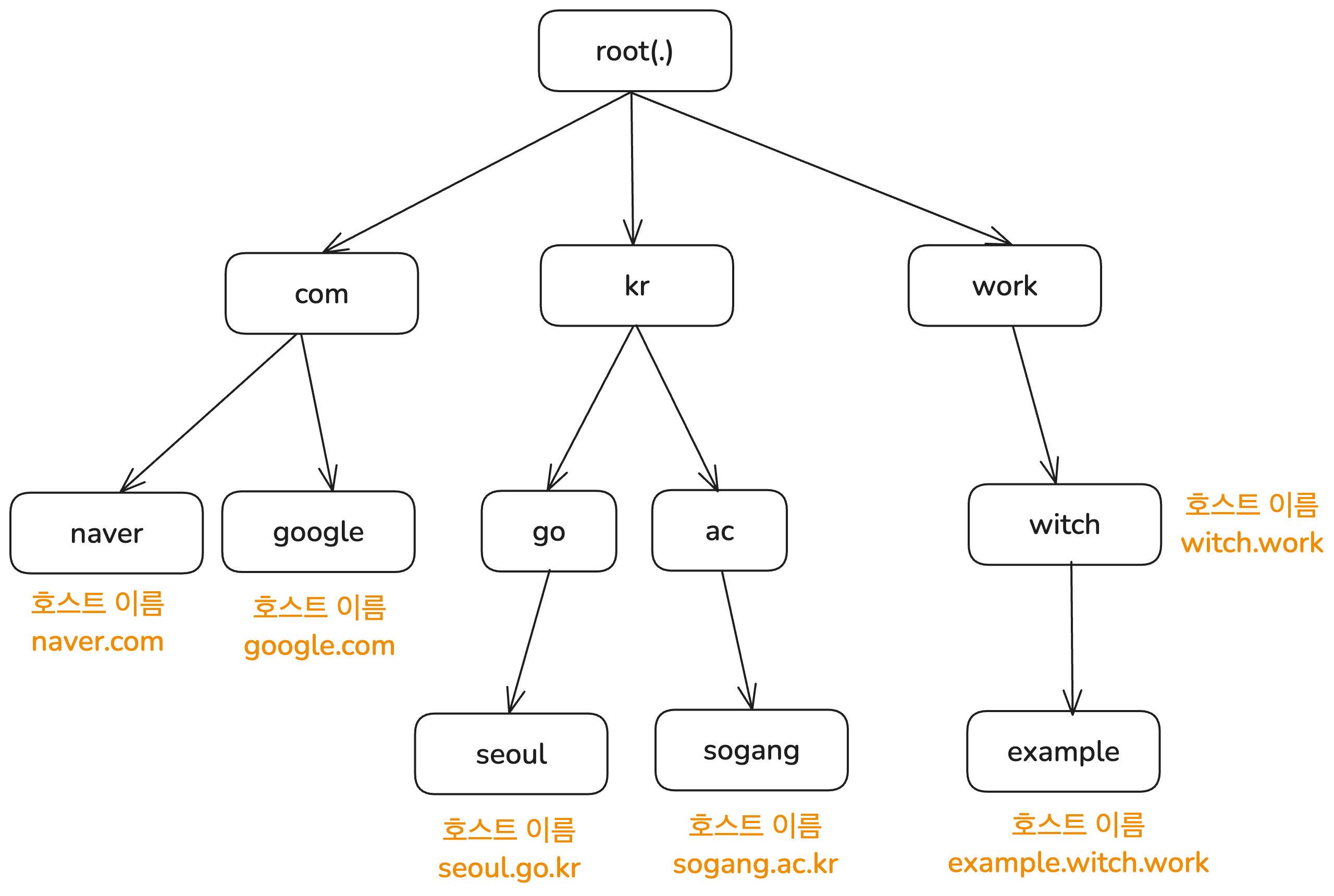
However, a unique host name does not mean there is only one record with that host name on a DNS server. As we’ll see in the next section, a single host name can map to multiple pieces of information in DNS.
Delegation of Management
In the previous article, I mentioned that DNS is hierarchical. So who manages each level? First, the root DNS servers are managed by IANA (Internet Assigned Numbers Authority), which is part of ICANN (Internet Corporation for Assigned Names and Numbers).
As you would expect from a distributed database, there is not just one central root DNS server. The root DNS system consists of 13 servers operated by 12 different organizations, with more than 1,000 instances (copies) distributed around the world.
The TLD DNS servers just below that were originally managed by SRI-NIC. Today, however, management has been delegated to various organizations in different countries. For example, the .com TLD is managed by VeriSign in the United States, and the .kr TLD is managed by KRNIC under the Korea Internet & Security Agency.
This is how DNS delegates management of lower levels to other organizations. The unit of delegation is called a zone, which you can think of as a subtree of the hierarchy shown above. An organization delegated a zone can manage it according to its own policies. For example, the organization managing the .gov TLD limits its use to U.S. government agencies.
How DNS Servers Store Information
Now we know DNS is hierarchical. So what information does a DNS server store, and how?
Resource Records
DNS servers map host names to various kinds of information. Sometimes that information is an IP address, sometimes it is the host name of the authoritative DNS server for that host name, and sometimes it is an alias. So how is this stored?
The DNS protocol does not strictly limit the kinds of data that can be associated with a host name. But for queries and responses between clients and servers to work properly, a minimum data format is needed. This is called a Resource Record (RR).
A DNS server stores values in type-specific formats using the host name, type, and class as a key. When a query arrives, the server looks up the information for that key and returns it. That key-value pair is the resource record. The host name to IP address mapping that happens whenever we access a site in a browser is also done through resource records.
A resource record has the following format:
<Name> <TTL> <Class> <Type> <Value>
The meanings of <Name> and <Value> depend on <Type>. Common record types and the meanings of their Name and Value fields are as follows. For more record types, see Cloudflare’s DNS record overview.
- A: Name is a host name, Value is an IPv4 address
- AAAA: Name is a host name, Value is an IPv6 address
- NS: Name is a domain, Value is the host name of the DNS server that has the IP address for hosts in that domain
- CNAME: Short for Canonical Name. Name is an alias host name, Value is the original host name
- MX: Name is a domain, Value is the canonical host name of the mail server for which
Nameis an alias
<TTL> stands for Time To Live and indicates how long the record remains valid. In other words, it defines when the record should be removed from cache.
If a DNS server is authoritative for host name X, then it contains the A or AAAA record for X. To find the authoritative DNS server for a host name, NS records are used.
And inserting new records into DNS is handled by registrars approved by ICANN. You can find a list of them at ICANN, List of Accredited Registrars.
I registered the witch.work domain using Cloudflare, which is on that list.
Checking Resource Records
To inspect the resource records stored on a DNS server, you can use the nslookup command. It sends a query to a DNS server and prints the response in a human-readable form. For example, to check the A record for witch.work, run the following command.
nslookup -type=A witch.work

# 응답
Name:	witch.work
Address: 104.21.32.1 # Cloudflare의 IP 주소이다
# 다른 IP 주소가 있을 수도 있다
If you want more information, you can use the dig command. It stands for Domain Information Groper and sends queries to DNS servers while printing detailed responses. It is installed by default on macOS, and on other operating systems you can install it yourself. It can do much more than simple lookups, including specifying DNS servers and tracing resolution paths. For more, see Querying and diagnosing DNS with the dig command.
Using dig, you can see detailed output including the DNS header, query contents, and response, as shown below. In practice, it also shows things like query time and which servers were involved, but I omitted those here because the output gets too long. You can see that a query consisting of a host name, type, and class is sent to the DNS server, and the server responds with the matching resource records.
$ dig witch.work

; <<>> DiG 9.10.6 <<>> witch.work
;; global options: +cmd
;; Got answer:
;; ->>HEADER<<- opcode: QUERY, status: NOERROR, id: 11209
;; flags: qr rd ra; QUERY: 1, ANSWER: 7, AUTHORITY: 0, ADDITIONAL: 1

;; OPT PSEUDOSECTION:
; EDNS: version: 0, flags:; udp: 4096
;; QUESTION SECTION:
;witch.work.			IN	A

;; ANSWER SECTION:
witch.work.		300	IN	A	104.21.80.1
# ...
The Class Field
There is one field in a resource record that I have not mentioned yet: <Class>. In most cases, the IN class is used, and other classes rarely appear in normal situations. Still, it’s worth covering the basics.
This field indicates what kind of network protocol or instance the resource record belongs to. The IN class we usually see means Internet. So what about the others? According to RFC 1035, the defined classes are as follows.
3.2.4. CLASS values
CLASS fields appear in resource records. The following CLASS mnemonics and values are defined:
IN 1 the Internet
CS 2 the CSNET class (Obsolete - used only for examples in some obsolete RFCs)
CH 3 the CHAOS class
HS 4 Hesiod [Dyer 87]
Besides the familiar IN, there are several other classes. They are rarely used today, but remain for historical reasons. Here is a brief summary of each, along with references.
- CS was the class used in the CSNET network. CSNET was created for institutions that could not connect directly to ARPANET, and it later led into NSFNET and then the Internet. See Wikipedia’s CSNET article.
- CH is the class for Chaosnet, a local network designed for Lisp Machines to use the Lisp language more efficiently. See A Short History of Chaosnet.
- HS was a name service used in Project Athena, a distributed computing project developed at MIT. See Wikipedia’s Project Athena article and Wikipedia’s Hesiod article.
NS Records and Delegation
Earlier, I said DNS is managed through hierarchy and delegation. This delegation is also represented through resource records in the database—specifically, NS records. An NS record maps a host name to the host name of the authoritative DNS server for that host. In other words, it is used to find the DNS server responsible for a given zone.
For example, root servers contain delegation information for TLD servers, so they store NS records like the following.
work.			172800	IN	NS	a.nic.work.
work.			172800	IN	NS	b.nic.work.
work.			172800	IN	NS	c.nic.work.
work.			172800	IN	NS	x.nic.work.
work.			172800	IN	NS	y.nic.work.
work.			172800	IN	NS	z.nic.work.
Next, we need to find the IP address of the TLD DNS server. But to find the IP address of the work. TLD DNS server, we need to look up a.nic.work. (or b.nic.work., or another one), which in turn seems to require knowing the address of the work. TLD DNS server. That creates a contradiction.
To solve this, when a DNS server responds, it also includes the A records for addresses such as a.nic.work.. Also, specifically to avoid this kind of contradiction in NS delegation, CNAME-based name indirection is not allowed there. So in principle, the actual response from a root server would look like this.
work.			172800	IN	NS	a.nic.work.
# 기타 NS 레코드들...
a.nic.work.		172800	IN	A  37.209.192.10
# 기타 A 레코드들...
DNS Messages
In Part 1 of the DNS series, I said that DNS request messages use UDP and are sent over port 53. We also just looked at how DNS servers store information. So what exact format is used to exchange that information?
DNS Message Format
First, the data exchanged between DNS servers and clients is in binary format and consists of a DNS header, query information, and lookup results. Each part contains several fields, but let’s start with the overall structure.
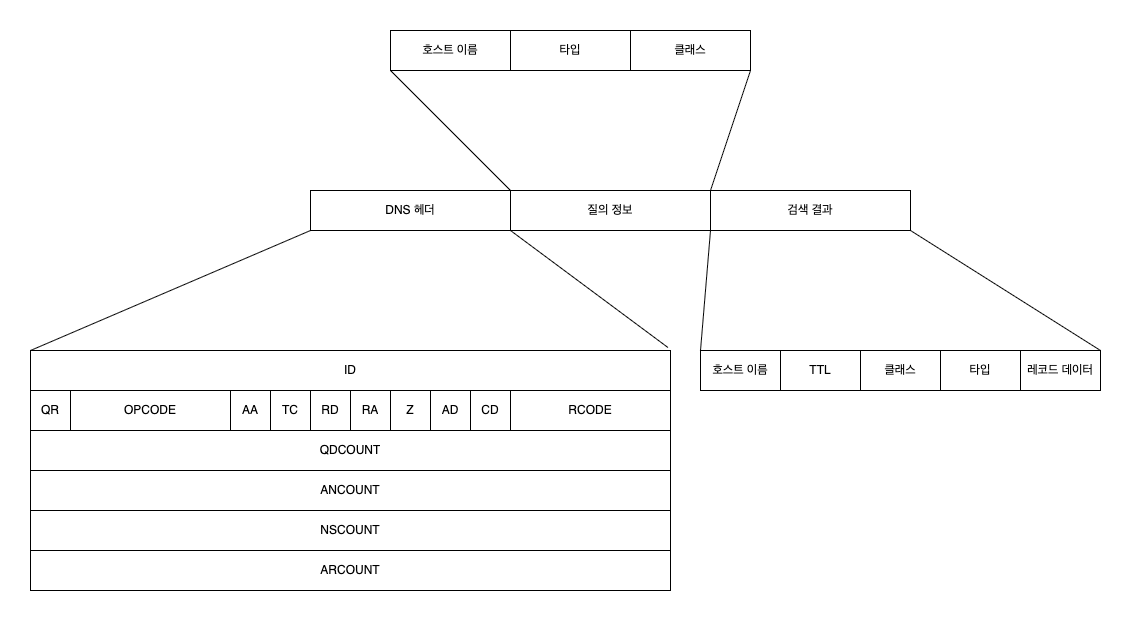
Some of this should already look familiar. The query information and lookup results are exactly what we discussed earlier. Since a DNS server uses host name, type, and class as the key, those become the query information, and the lookup result is the resource record data.
That leaves the DNS header.
DNS Header Fields
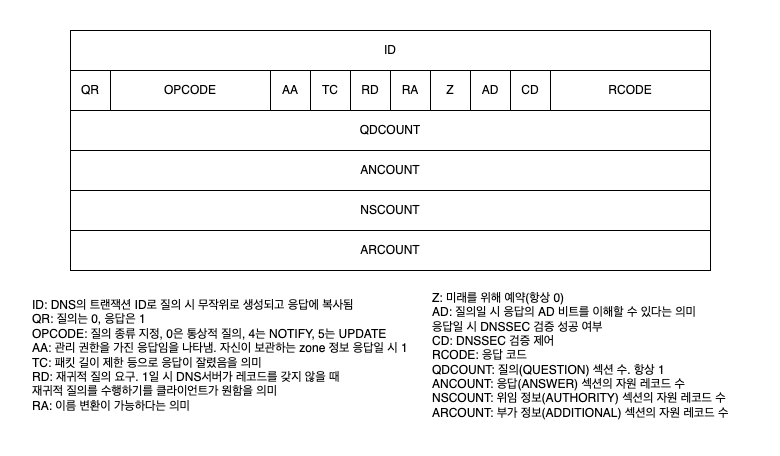
As shown above, the DNS header contains a lot of information. Of these, the RD and AA fields are especially worth highlighting.
The RD field indicates whether this DNS message is a recursive query. A recursive query means asking another server to obtain the required information on your behalf.
For example, a stub resolver does not query DNS servers directly for the IP address of the host name it needs. Instead, it sends a query to a full resolver. That is a recursive query, so the RD bit in the DNS message from the stub resolver to the full resolver is 1. By contrast, a full resolver queries DNS servers directly, which is an iterative query, so the RD bit in that case is 0.
The AA field stands for Authoritative Answer and indicates whether the responding server is the authoritative DNS server with management authority over the queried host name. If it is 1, that means the DNS server is authoritative for that host name. While performing recursive resolution, when a full resolver receives a response with the AA bit set to 1—that is, from a server with authority—it can cache that response and return it to the stub resolver.
You can refer to the following figure for the other DNS header fields if needed.
How DNS Servers Reduce Load
Almost nobody types an IP address directly to access a website. Most people use host names like google.com. Since DNS lookups happen whenever a site is accessed by host name, DNS servers must handle a huge volume of requests. To do this efficiently and reduce the cost of the long request-response process described above, DNS uses several optimization techniques.
Caching
First, caching is used at several stages. Modern web browsers cache DNS records for a certain period of time. When a user queries a DNS record, the browser cache is checked first. In Chrome, you can inspect cached DNS records at chrome://net-internals/#dns.
Stub resolvers and full resolvers also cache results. The TTL (Time To Live) value in a resource record defines how long that cache remains valid. Until it expires, if a query for the same host name arrives, the cached response can be returned immediately. In fact, the requirement for full resolvers to implement local caching is explicitly defined in RFC 1123.
(A) Full-Service Resolver
- The resolver MUST implement a local caching function to avoid repeated remote access for identical requests, and MUST time out information in the cache.
RFC 1123, Section 6.1.3.1 Resolver Implementation
Caching the values of resource records is not the only way to reduce DNS server load. By caching information about other DNS servers, it is also possible to avoid sending queries to higher-level servers in the hierarchy and reduce their load as well.
For example, when receiving a DNS query for a specific host name, even if there is no cached A record, there may still be a cached NS record for that host name. In that case, the resolver can query the name server from the NS record directly, without going through the recursive resolution steps again. Or if it has cached the IP address of a TLD DNS server, it can avoid querying a root DNS server.
DNS Server Redundancy
The simplest way to reduce the load on each individual server is to increase the number of servers. This also has the advantage that if one server goes down, others can continue providing service. DNS uses this approach as well, in the form of Primary/Secondary DNS.
In this setup, the records for a zone managed by the Primary DNS server are also replicated and stored on Secondary DNS servers. By default, Round Robin DNS is used so that each DNS server responds to queries in turn. If the Primary DNS server goes down, the Secondary DNS servers can continue answering queries.
The issue this raises is how to synchronize data across these replicated DNS servers. The original method was for a Secondary DNS server to periodically query the Primary DNS server to check for changes. Protocols called AXFR and IXFR are used for this, along with the SOA (Start of Authority) record.
The SOA record stores information about the DNS zone managed by the server, including a kind of serial number. Whenever the zone changes, that serial number changes as well. When a Secondary DNS server queries the Primary DNS server and finds that the serial numbers for the two zone copies differ, it requests data transfer from the Primary to synchronize.
This transfer of zone information from the Primary DNS server is called a zone transfer, and it uses TCP for reliability.
However, with this synchronization method, the delay can become large depending on how often the Secondary DNS server polls. To reduce that delay, there is a notification mechanism called NOTIFY, where the Primary DNS server informs Secondary DNS servers when changes occur. After receiving a NOTIFY message, a Secondary DNS server can decide whether to query the Primary DNS server.
References
Much more detailed information about DNS is summarized in RFC 9499.
Paul V. Mockapetris, Kevin J. Dunlap, Development of the Domain Name System
James F. Kurose, Keith W. Ross, translated by 최종원, 강현국, 김기태 and five others, Computer Networking A Top-Down Approach, 8th edition
Edited by the Gijutsu-Hyoron editorial department, translated by 진명조, Infrastructure Engineer’s Textbook - System Construction and Management Edition, Chapter 5, “The Modern DNS Textbook”
Gabia Library, DNS Components – ② Domain Name Server
https://library.gabia.com/contents/domain/4146/
Querying and diagnosing DNS with the dig command
Akamai, What Is Recursive DNS?
https://www.akamai.com/ko/glossary/what-is-recursive-dns
cloudflare, What Is DNS? | How DNS Works
https://www.cloudflare.com/ko-kr/learning/dns/what-is-dns/
IBM Technology, "What are DNS Zones And Records?"
https://www.youtube.com/watch?v=U-i_UDDYLxY
IBM Technology, "Primary and Secondary DNS: A Complete Guide"