What NAT Is, What Problems It Solves, and What Problems It Creates
While doing a network study, I ended up researching NAT. This post combines what I learned there with some additional research.
I referred heavily to these NAT-related articles by Changmo Yoo on Netmanias. Individual links are listed in the references section.
What is NAT?
Definition of NAT
NAT (Network Address Translation) is a technique that translates addresses so hosts on a private network can connect to an external public network. In most cases, a router or firewall that connects a LAN to the internet performs IP address translation using NAT.
In general, when people say NAT, they often include both Basic NAT, which maps private IPs to public IPs in a 1:1 manner, and NAPT (Network Address Port Translation), which translates IP addresses together with port numbers. Since most NAT devices support both, and RFC 3022 also groups them together as Traditional NAT, I will not distinguish between them in this post.
How NAT works
So how does NAT actually work? Assume we are using NAPT (Network Address Port Translation), which also translates port numbers. In that case, a NAT router performs translations like these:
- When sending data outward:
(private IP address of the sending device, port number) -> (public IP address of the NAT router, port number) - When receiving data from outside:
(public IP address of the NAT router, port number) -> (private IP address of the receiving device, port number)
Let’s look at an example for outgoing data. Suppose a device with private IP 192.168.0.10:8080 sends data to 128.119.40.186:80. The device’s private IP may be assigned statically or dynamically through DHCP, but that detail is not important here. Assume the NAT router in the middle has the public IP address 203.0.113.25. The transmission process then works like this.
First, the device 192.168.0.10:8080 on the private network sends a datagram whose destination is 128.119.40.186:80. This datagram reaches the router using NAT first. The router has not only a public IP address but also a private IP address inside the private network. In the diagram, those IPs are shown in blue.
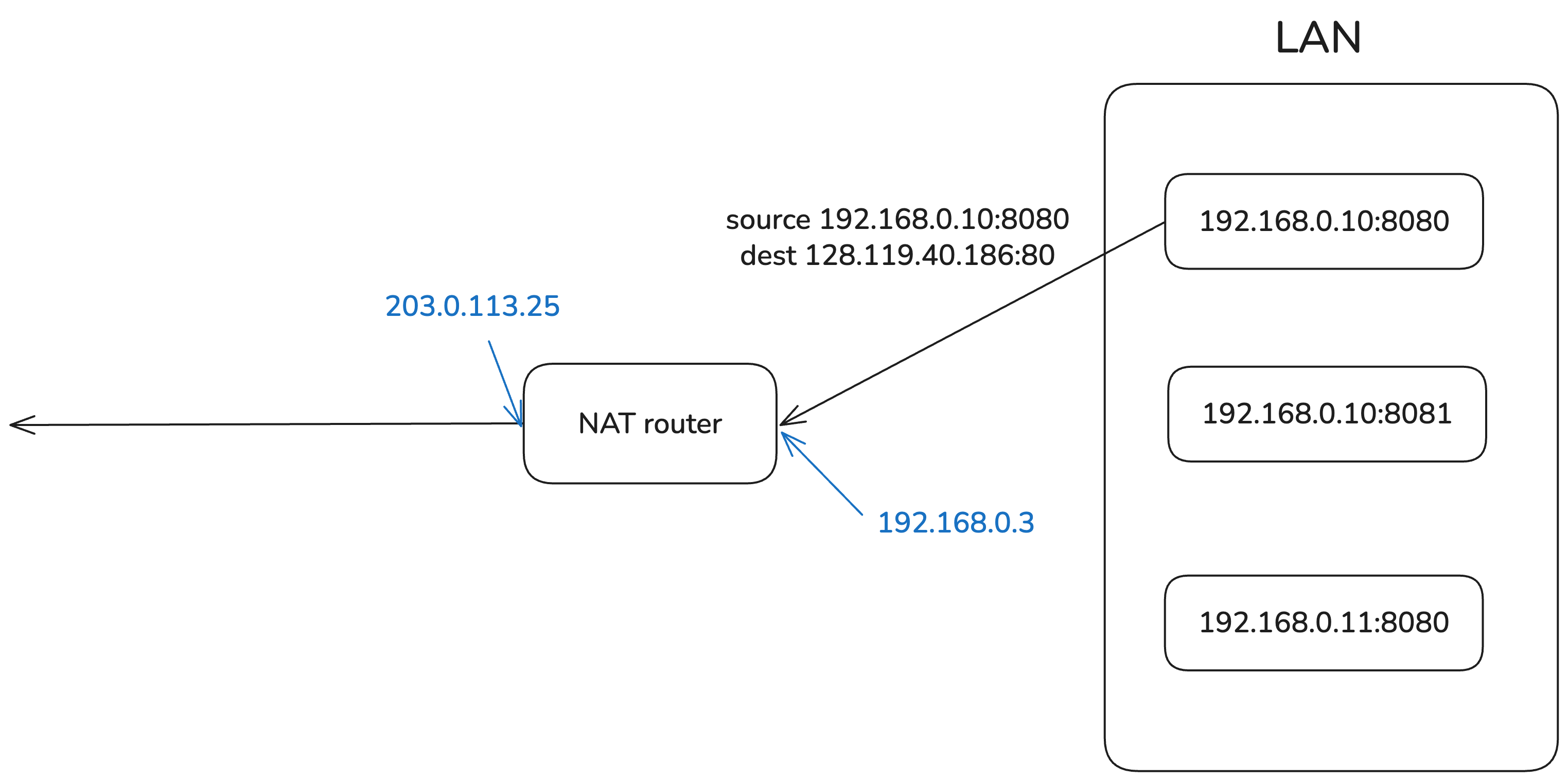
The router maintains a table that maps private IP address + port number to public IP address + port number using NAT. It uses this table to translate the source address of the datagram and then forwards it outside.
The table used for IP address mapping is updated by the router as needed when it detects outbound traffic. If the (private IP, port number) in the datagram is not in the table, the router allocates a new external port, creates a mapping, and stores it in the table so it remains valid for some period of time. This mapping is bidirectional, so it can also be used when a datagram comes in from outside, but updates only happen when data goes from inside to outside.
Here, I drew the diagram assuming the mapping already exists in the table.
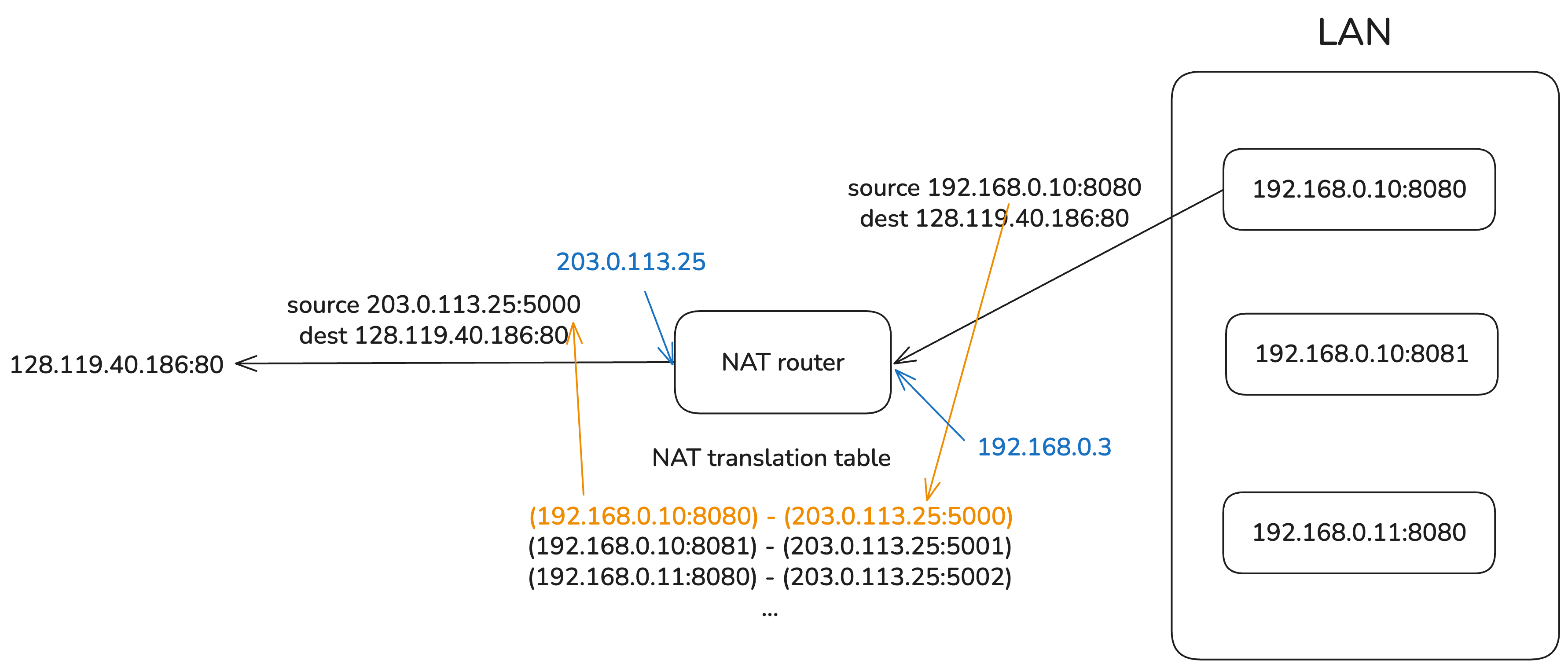
The translated datagram then passes through routers on the internet and, assuming no network error occurs, can reach its final destination 128.119.40.186:80.
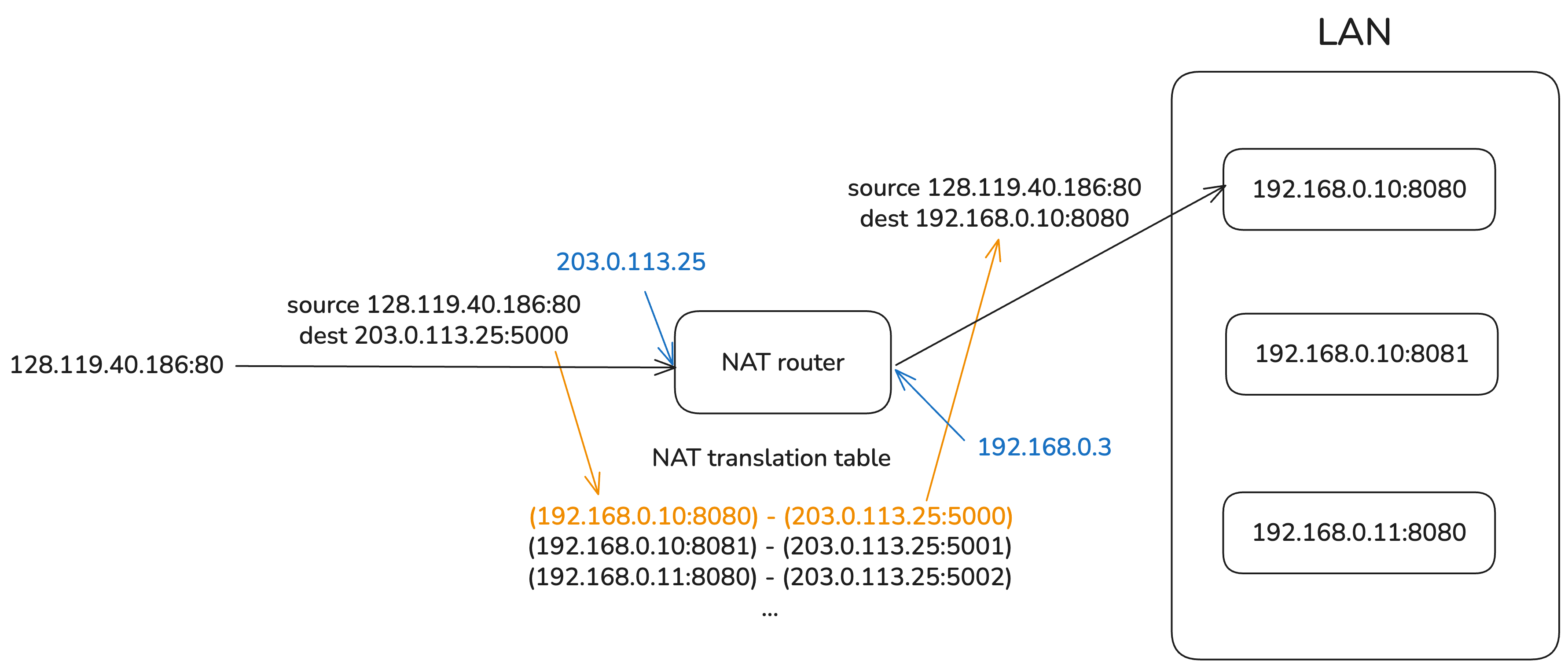
The response reaches the destination inside the private network in the reverse order. When the router receives the response datagram, it looks up the mapping table, translates the destination address into a private IP address + port number, and forwards the datagram to the destination inside the private network.
The private IP address used here belongs to one of these ranges: 10.0.0.0/8 (class A), 172.16.0.0/12 (class B), or 192.168.0.0/16 (class C). Since these ranges are defined by the IANA for private IP use, they cannot be routed on the internet.
The port numbers used here are also somewhat standardized. The destination port number is either 0-1023 (well-known ports) or 1024-49151 (registered ports). The source port number, meaning the port number used by the address inside the private network, is assigned arbitrarily by the router. It varies by operating system, but it is usually somewhere between 30000 and 60000.
Benefits of using NAT
NAT also has clear advantages. These come from the fact that the externally visible IP address differs from the internal IP address, and from the outside the entire private network appears to have only a single public IP.
- Conserves IPv4 addresses because all devices in the private network share one public IP address
- Allows changes to network settings, such as device addresses inside the LAN, without affecting external communication
- Allows the public IP address to change without changing the private IP addresses of devices inside the private network
- Improves security because NAT prevents direct access from outside to internal IPs
External Access and Port Forwarding
The problem with NAT
We looked at how NAT works above. But there was this sentence in the middle:
The table used for IP address mapping is updated by the router as needed when it detects outbound traffic.
For a mapping between (private IP address of the sending device, port number) <-> (public IP address of the NAT router, port number) to be registered in the NAT table, there first has to be outbound data from a device inside the private network through the router. Of course, there are cases where inbound traffic also updates the NAT table1, but in most cases the NAT table is refreshed only when outbound data exists.
This creates a problem. NAT cannot properly handle cases where an external host needs to connect to a specific device inside the private network and exchange data with it. That can be a security advantage, but it becomes a problem when you need to operate many services behind a private network.
A typical example is hosting a site on a deployment server inside a private network. Since a deployment server does not often send data to users first, there are many cases where no NAT table mapping exists. Then how can you make the deployed site accessible from outside?
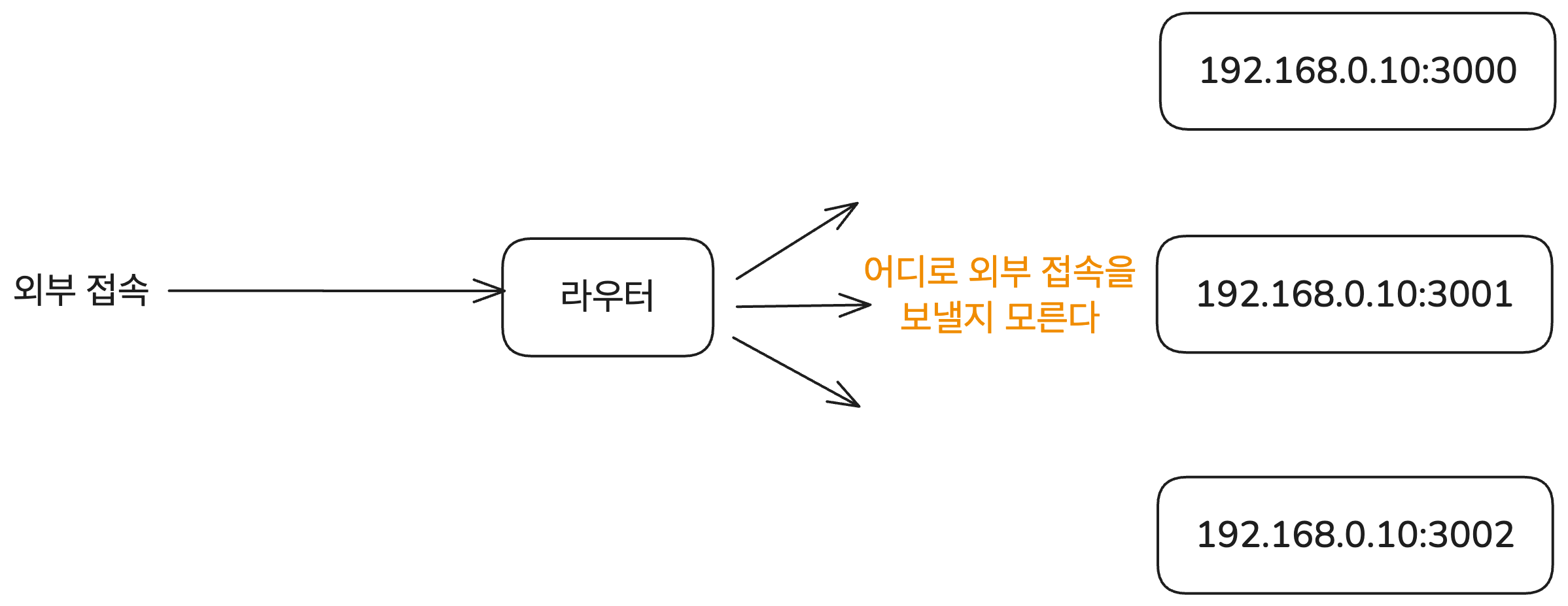
The solution is port forwarding.
Port forwarding
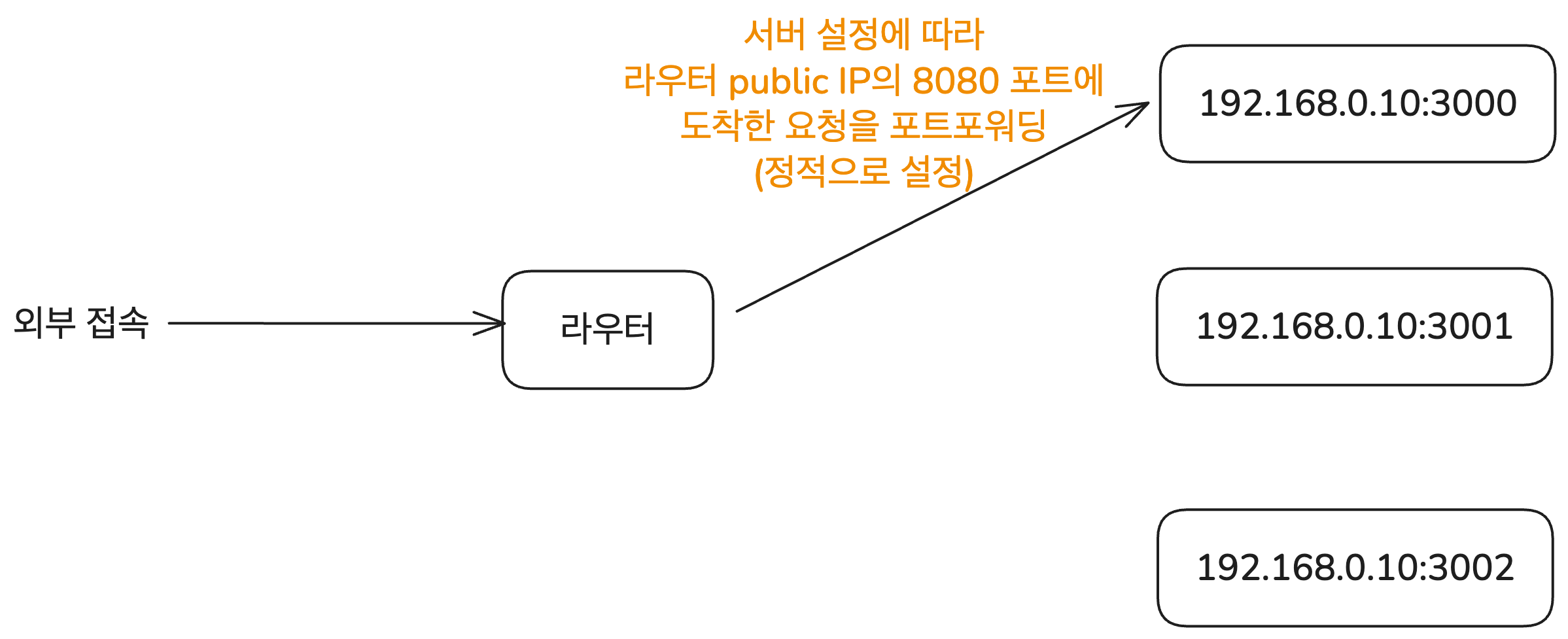
The simplest way to allow external access to the appropriate host inside a private network is port forwarding. This is a method where you explicitly specify which address inside the private network should receive requests that arrive on a specific external port. It is useful when the connection is static, as in “requests coming in on this external port should go to this host inside the private network.”
For example, all requests that arrive on port 8080 of the router’s public IP can be forwarded to 192.168.0.10:3000 inside the private network. This can be configured using tools such as nginx or Apache.
Visually, it looks like this. This mapping is configured statically. In other words, every time you need a mapping for a specific host inside the private network, you must configure it on the router.
Universal Plug and Play (UPnP)
However, manually configuring port forwarding every time external access is needed is cumbersome. A private network can contain many kinds of devices such as printers, game consoles, and IoT devices. Manually setting up port forwarding whenever any of them needs external connectivity is inefficient.
That is why Universal Plug and Play (UPnP, defined in RFC 6970) was introduced. It is a technology that lets devices on a network automatically discover each other and communicate by requesting port forwarding.
There are other technologies as well, such as NAT-PMP and SOCKS, but since automatic port mapping is not the main topic of this post, I will only cover UPnP here. If needed, refer to the RFC documents for those technologies.
A router that supports UPnP can automatically configure port forwarding when a host inside the private network sends a request. For example, if an application such as a torrent client or a game asks, “Open external port 12345 for me,” the router updates the NAT table accordingly and forwards requests arriving on external port 12345 to that host.
In this way, UPnP allows various devices on the same LAN, such as printers and game consoles like Xbox, to automatically discover and connect to each other.
This lets the router adapt automatically even when devices or ports change. As a result, the user does not need to manually intervene in router settings, and even non-experts can easily use apps that require port forwarding.
However, UPnP also has security weaknesses, so it should be used carefully. Since UPnP was designed for use within a LAN, it does not provide authentication or access control by default. That means any device on the same network can freely send port forwarding requests and open ports.
So if a malicious actor manages to enter a network handled by a UPnP-enabled router, they can send port forwarding requests for any device on the same network, open arbitrary ports, and create a path for receiving malicious requests from outside. Some routers even accept UPnP requests from outside, which means their settings can be changed remotely.
Because of these weaknesses, some recommend disabling UPnP. In practice, corporate networks and public Wi-Fi environments that prioritize security commonly do not allow UPnP or port forwarding.
Then how do you handle cases where different devices need to establish direct connections under these constraints, whether they are on the same private network or not? The technology needed in that situation is NAT Traversal.
NAT Traversal
In practice, the real problem NAT creates for external access is P2P (peer-to-peer) communication. For example, suppose two users need to make a video call. The two computers then need to establish a direct connection and exchange data with each other.
But in general, personal computers belong to private networks such as home Wi-Fi or a company LAN. That means both sides are using addresses inside private networks behind NAT, and there is no externally reachable address that can directly identify each host. In this situation, if the two hosts want to establish a direct connection, they need a way to get around NAT. The set of techniques that solve this and enable two hosts to connect directly is called NAT Traversal.
Several techniques, including the UPnP discussed above, implement NAT Traversal through communication between applications and NAT devices. There are also many requirements and implementation types for NAT Traversal technologies. If you want to go deeper, refer to Changmo Yoo’s articles on Netmanias, especially this one.
However, since there are too many variations and implementation details, I will only briefly explain well-known methods where the application implements NAT Traversal without directly changing the NAT device. These methods are described in detail in RFC 5128. I also left several related links in the references section if you want to read more.
Relay
The core issue with current NAT devices is that they were ultimately designed around the client-server paradigm, where one side sends data and the other side receives it through a public address. But P2P communication requires both sides to be able to send and receive data, which is where NAT causes trouble.
So what if both sides exchange data through another public server in the middle? Then communication between the two devices can behave like two client-server communications rather than one direct P2P communication.
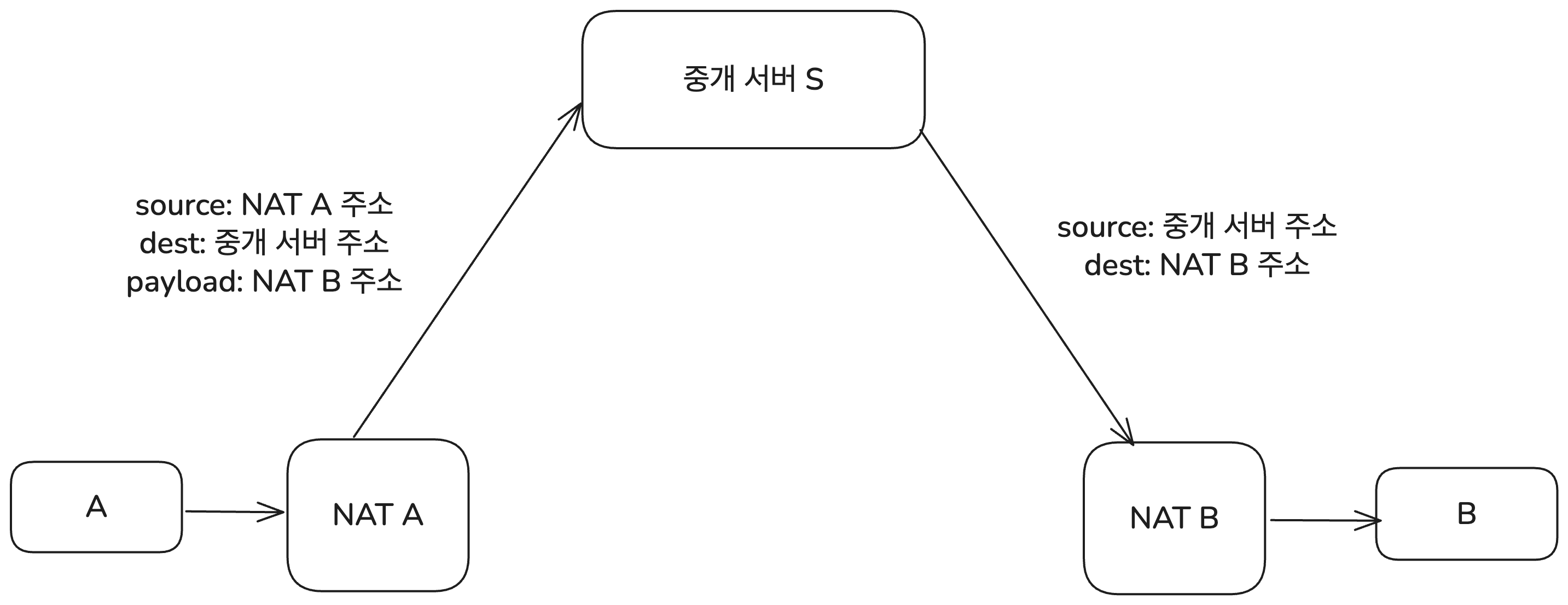
When A sends data to B, A first sends the data to the relay server and includes B’s address in the payload. The relay server receives it and forwards it to B. The same applies when B sends data, just in the opposite direction.
This method is called Relay. Two hosts use a public relay server known to both of them (called a Rendezvous Server in RFC 5128), and both sides exchange data through that server. It is the most reliable method and works with all NAT behaviors.
Its disadvantages are fairly obvious from the structure. It increases the load on the relay server and consumes more network bandwidth, and it can introduce communication latency. So for efficient P2P communication, other methods should be considered first. The TURN protocol (Traversal Using Relays around NAT) defines a more concrete way to implement this Relay approach.
Connection Reversal
A better NAT Traversal technique is Connection Reversal. This method can be used only if one of the two hosts involved in the P2P communication has a public IP address.
Suppose A is a host behind a NAT device, and B is a host with a public IP address. Then A sending data to B is not a problem at all. It can just send to B’s public address. But how can B send data to A? That is where Connection Reversal comes in. The goal is ultimately to create outbound traffic from A to B so that a mapping is created in the NAT table of the router handling A.
The process works like this. First, A behind NAT establishes a connection with the relay server. Then the relay server has the information needed to establish a connection with A. Next, when B wants to establish a connection with A, it first sends the relay server its own information along with a payload saying, “I want to send data to A.”
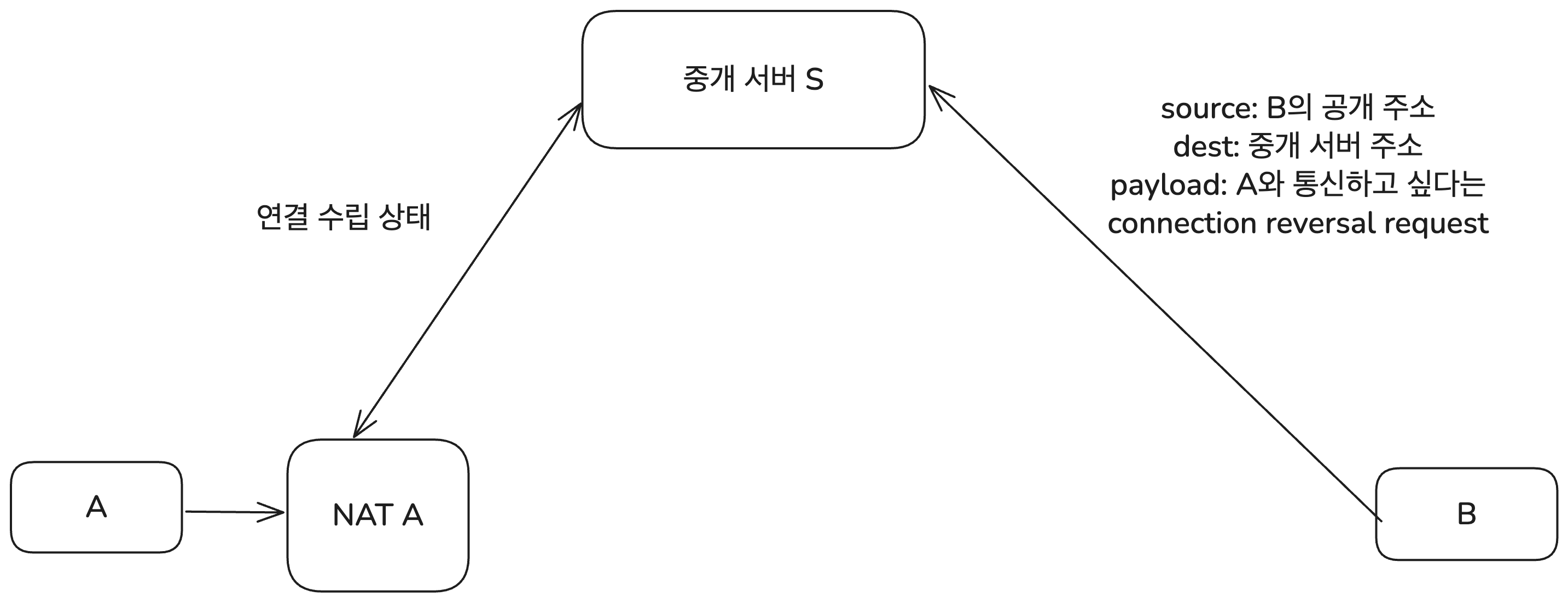
The relay server then sends A the information that “B requested a connection.” This is delivered to A through the NAT responsible for A’s network. The payload here includes B’s public IP address and port number.
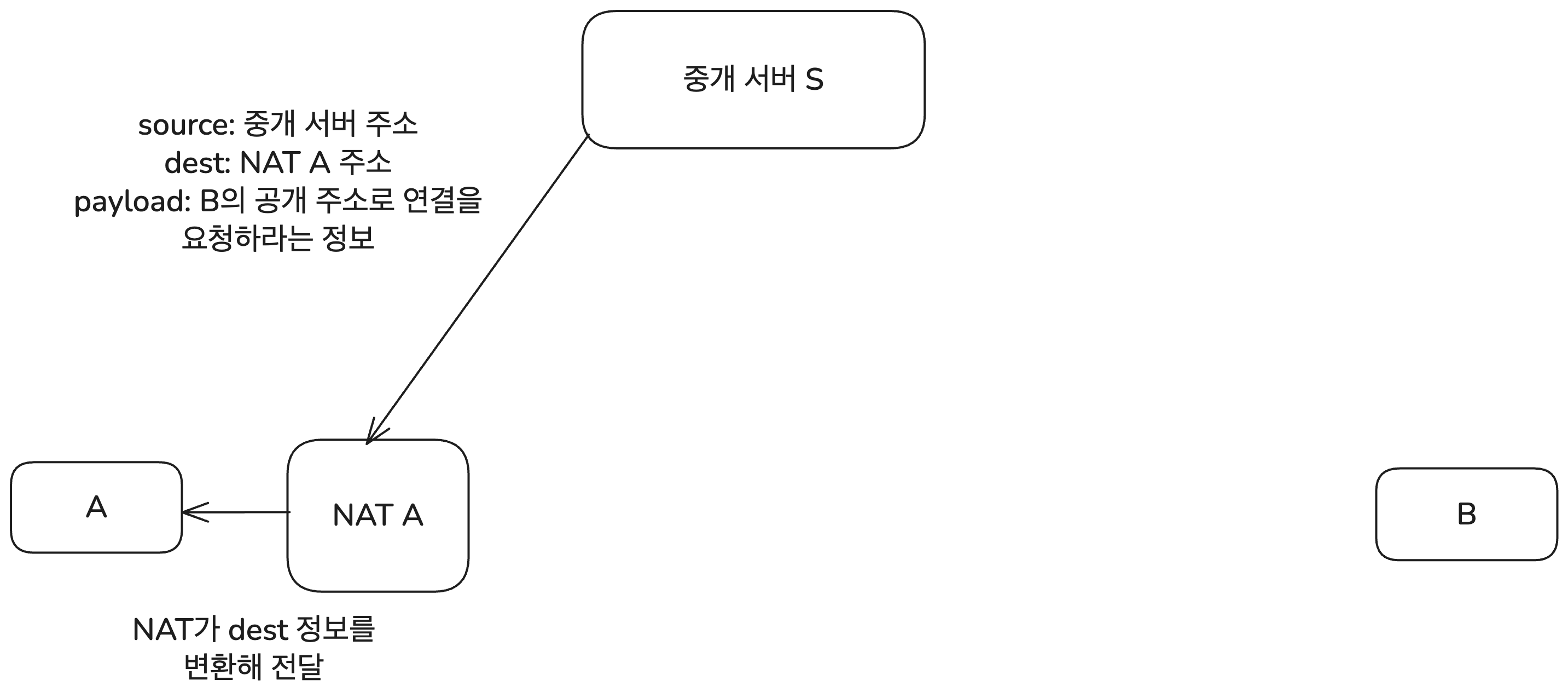
A receives this information and attempts to connect to B’s public address. In that process, the NAT device registers A’s private IP address and port number in its mapping table.
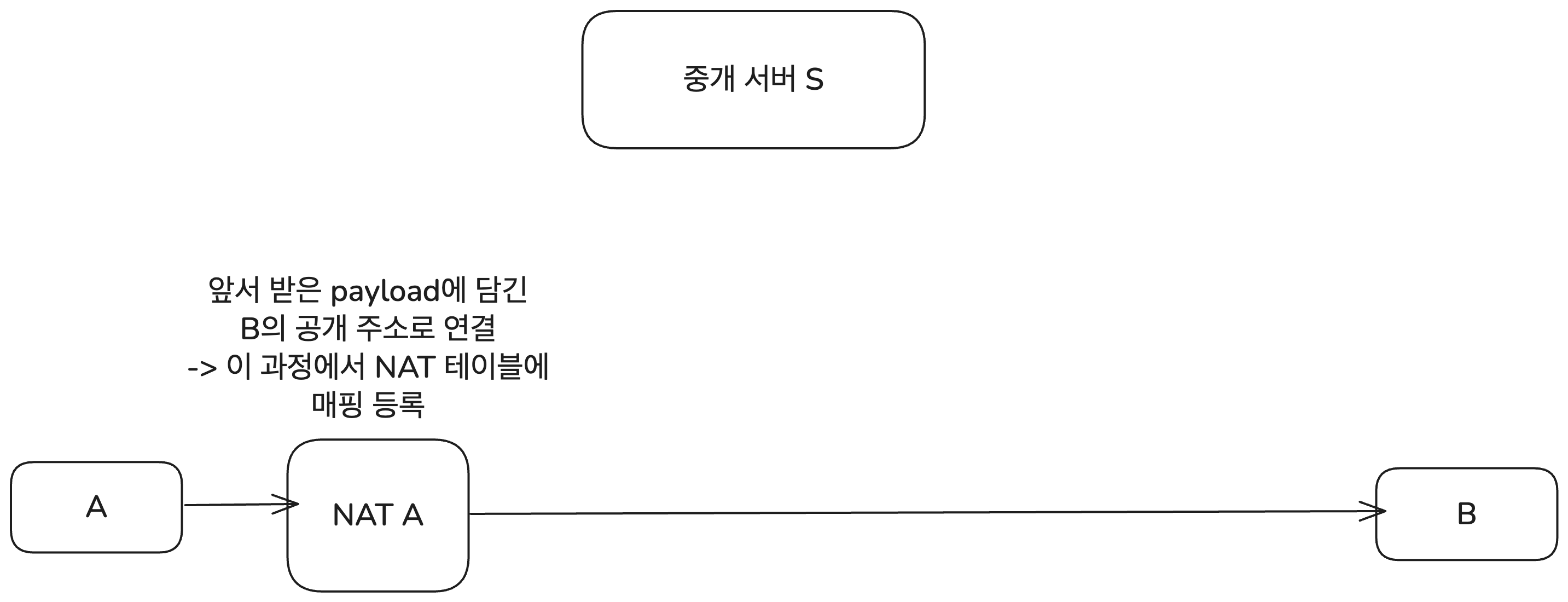
From this point on, if B sends data to A’s public address and the proper port, the NAT device can deliver the data to A’s private IP address. In other words, A and B can now establish a direct connection.
Once the connection has been established, A and B can exchange data directly without going through the relay server. Naturally, this is more efficient than Relay. However, the limitation is that one of the two hosts must have a public IP address.
UDP Hole Punching
In reality, it is common for both hosts participating in P2P communication to be behind NAT. In that case, Connection Reversal obviously cannot be used. Relay is inefficient. The technique that makes P2P communication possible even in this situation is UDP Hole Punching.
This relies on a property of EIM-NAT (Endpoint Independent Mapping NAT). EIM-NAT has the characteristic that traffic leaving from the same internal address + port uses the same public address + port even if the destination changes. That is why it is called endpoint-independent mapping.
Skipping some of the finer details and edge cases, the basic principle is as follows. Suppose two hosts, A and B, want to communicate via P2P. Then A and B each establish a connection with a public relay server S. Naturally, this goes through NAT, and the payload of the connection request message also includes each host’s private IP address and port number.
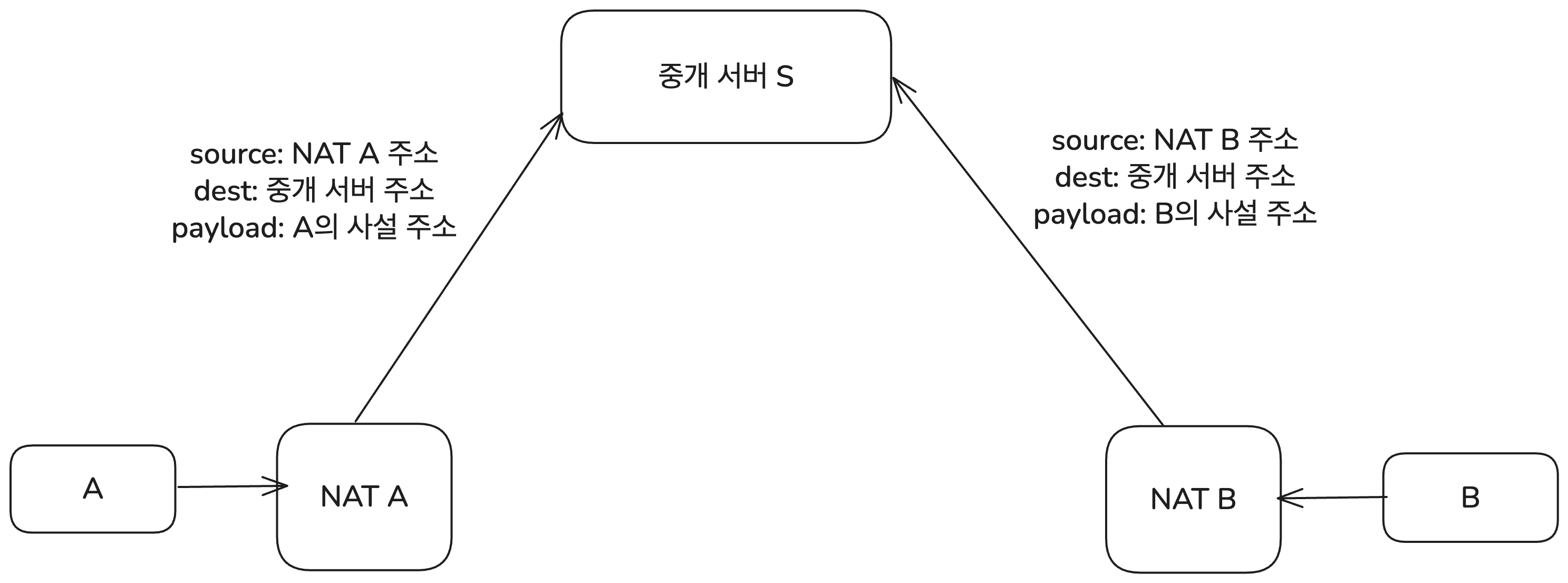
At this point, the relay server knows A and B’s public IP addresses and port numbers, as well as their private-network IP addresses and port numbers. Then A, which wants to communicate with B, first sends a request message to the relay server asking to connect to B. The payload at that time includes the public IP address and port number of the NAT router responsible for B.
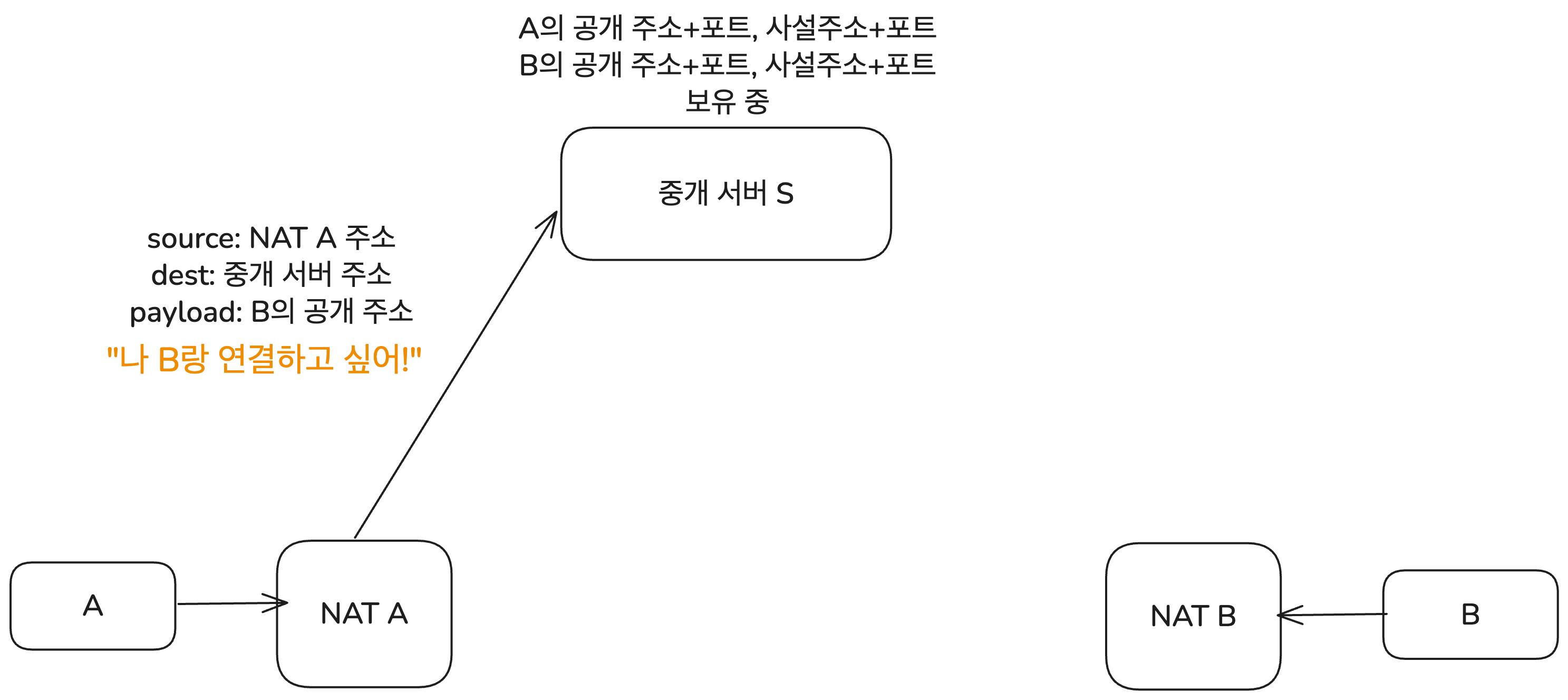
When the relay server receives this request, it sends A the private-network IP address and port number of B that it already knows. At the same time, it also sends B A’s public IP + port and private IP + port number.
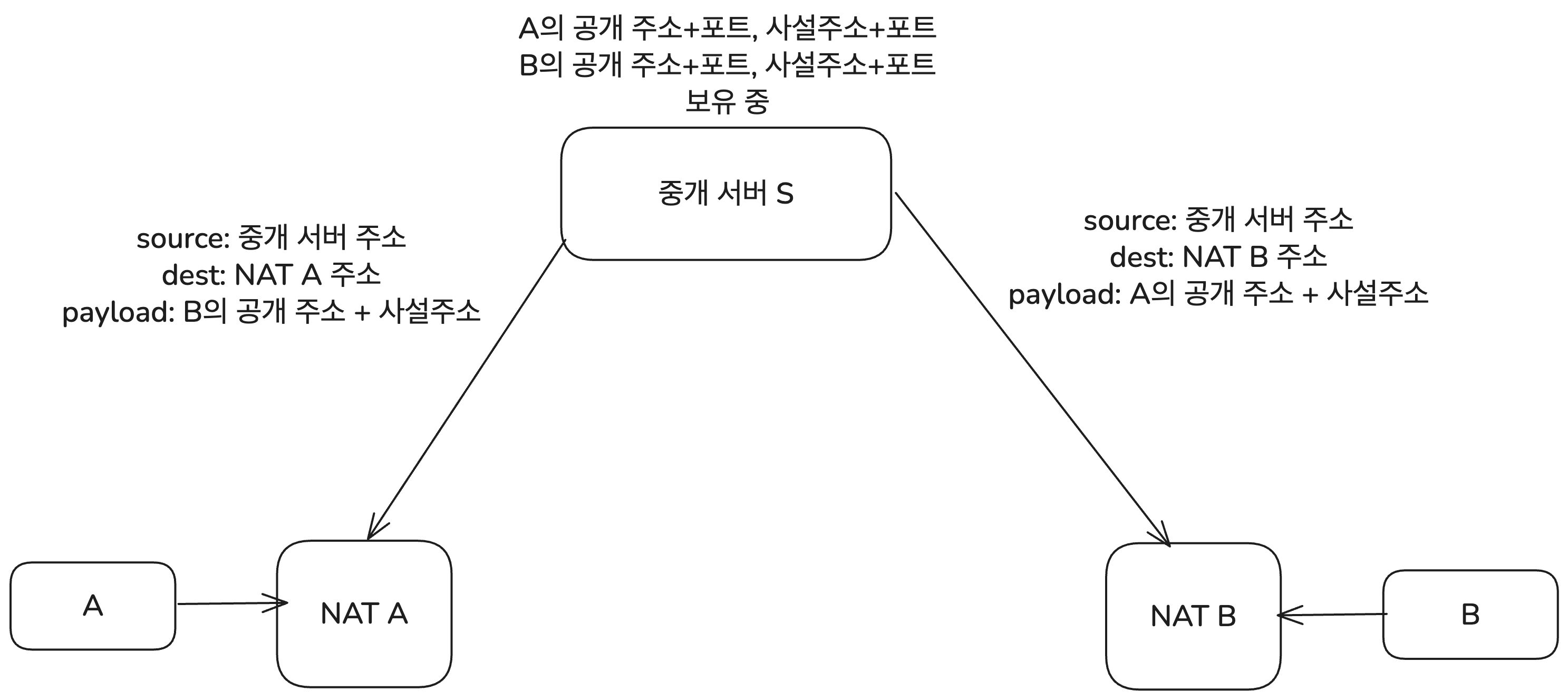
The reason private-network addresses are also exchanged is that A and B may be on networks connected to the same NAT device. In that case, they connect using private IP addresses without NAT address translation. This process is called Hairpinning, but since not all NAT devices support it and it is outside the main topic here, I will skip the details. If needed, refer to RFC 5128.
Now the connection starts to form. A and B simultaneously try to connect to each other’s public endpoints. Suppose A attempts first. When A sends a packet to B’s public endpoint, NAT A creates a new mapping for it. At first, B may block packets coming from A because A’s endpoint is not yet registered in NAT B’s mapping table.
But B also soon attempts to connect to A, and at that moment B’s NAT device registers A’s endpoint in its mapping table. From then on, NAT B allows packets arriving from A. Because of the EIM-NAT property, once there is an outbound connection attempt, you can think of a hole being opened for that endpoint. That is why this process is called Hole Punching.
In other words, when both sides try at the same time, the proper mappings are quickly created in both NAT devices. As a result, A and B can communicate directly. That is UDP Hole Punching. Of course, it only works on NAT devices that support EIM-NAT.
A similar technique can be used with the more familiar TCP, but it is more complex than with UDP. TCP uses the well-known 3-way handshake, so establishing the connection is more complicated. Also, many NAT devices do not support TCP Hole Punching. That is why UDP Hole Punching is often considered first, so I will omit the detailed TCP Hole Punching process in this post.
Additional Information
Real-world NAT involves many more issues than this post could cover.
There are issues with NAT itself, such as firewalls and security, and beyond the briefly discussed UPnP there are many other technologies related to opening external ports. Also, in real P2P communication, it is common to combine multiple NAT Traversal techniques to ensure stable connectivity across diverse network environments. For example, trying UDP Hole Punching, then Connection Reversal, then Relay in that order.
There is also a protocol designed to find the best path that allows two hosts to establish a direct connection and communicate. That is ICE (Interactive Connectivity Establishment), defined in RFC 8445. It is currently one of the most widely used NAT Traversal-related protocols in P2P communication.
This post covered NAT briefly. Still, I think it includes enough for most web development interviews. If needed, though, the reference links below provide deeper explanations of NAT’s operating principles and its many issues. You can also learn more about NAT Traversal techniques through the RFC documents.
References
Masahiro Kihara, translated by Mose Kim, "Server Basics Made Easy Through Diagrams and Operating Principles"
Network NAT, NAPT, Port Forwarding
Beyond NAT for P2P Communication
https://velog.io/@sharlotte_04/P2P-NAT
Introduction to NAT (Network Address Translation) (RFC 3022/2663)
https://www.netmanias.com/ko/?m=view&id=blog&no=5826
NAT Devices Should Be Built Like This... (RFC 4787) - Part 1: Mapping Behavior
https://www.netmanias.com/ko/?m=view&id=blog&no=5833
What is UPnP and why you should disable it immediately
https://nordvpn.com/ko/blog/what-is-upnp/
What Is UPnP and Why Is It a Security Risk?
https://securityscorecard.com/blog/what-is-upnp-and-why-is-it-a-security-risk/
What is UPnP? Yes, It's Still Dangerous in 2025
https://www.upguard.com/blog/what-is-upnp
RFC 5128 - State of Peer-to-Peer (P2P) Communication across Network Address Translators (NATs)
https://datatracker.ietf.org/doc/html/rfc5128
P2P and NAT: Introduction to NAT Traversal Techniques (RFC 5128) - Part 1: Relaying & Connection Reversal
https://www.netmanias.com/ko/?m=view&id=blog&no=6264
P2P and NAT: Introduction to NAT Traversal Techniques (RFC 5128) - Part 2: UDP Hole Punching
https://www.netmanias.com/ko/?m=view&id=blog&no=6263
Chapter 30. Understanding ICE
https://brunch.co.kr/@linecard/156
How NAT traversal works — Figuring out firewalls
https://blog.apnic.net/2022/04/12/how-nat-traversal-works-figuring-out-firewalls/
How NAT traversal works — The nature of NATs
https://blog.apnic.net/2022/04/19/how-nat-traversal-works-the-nature-of-nats/
How NAT traversal works — NAT notes for nerds
https://blog.apnic.net/2022/04/26/how-nat-traversal-works-nat-notes-for-nerds/
Footnotes
-
More precisely, this is about Mapping Refresh Behavior—that is, the rule defining when the timer that determines how long a mapping is stored gets refreshed. If "NAT Inbound refresh behavior" is True, the mapping is refreshed whenever an inbound datagram arrives. ↩